Short answer
A phone speaker distorts at high volume because its tiny diaphragm runs out of travel and the amplifier runs out of headroom. A little harshness in the top two volume steps is normal. Distortion at half volume is not.
The song sounds fine until the last few clicks of the volume button, and then it turns to gravel. It is tempting to conclude that the speaker is broken, or that the phone was never much good.
Usually neither is true. Most pages on this topic hand over a list of fixes for a problem that often does not need fixing. The useful question is whether this particular distortion is the ordinary kind, and that can be answered in a few minutes.
Why Does a Small Speaker Distort When Turned Up?
Loudness comes from moving air. A speaker moves air by pushing a diaphragm back and forth, and a phone’s diaphragm is roughly the size of a fingernail.
To be loud, something that small has to travel a long way on each stroke. There is a physical limit to that travel, set by the suspension that holds the diaphragm and the gap the coil sits in. Near the limit the movement stops following the music accurately.
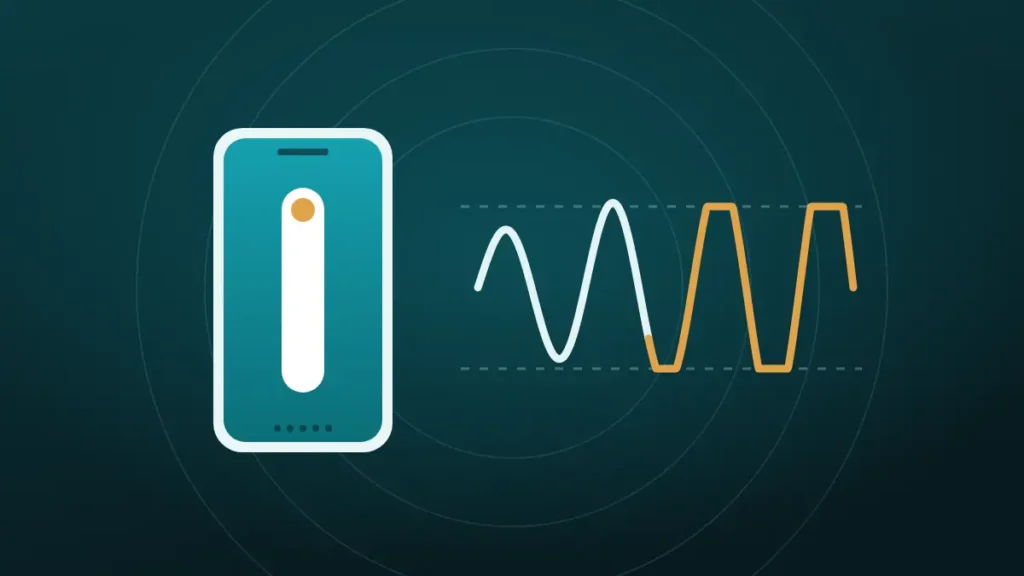
The amplifier has a ceiling too. When the signal asks for more voltage than the phone can supply, the tops of the sound waves get flattened. Engineers call that clipping, and ears hear it as a harsh, fuzzy edge.
Both limits arrive at about the same place, which is the top of the volume scale. Phone makers tune their speakers to get as loud as possible, so full volume sits right at the edge by design.
What the Different Kinds of Distortion Mean
Not all distortion sounds alike, and the type is a clue to the cause.
| What it sounds like | Usual cause | Normal at full volume |
|---|---|---|
| Harsh, fuzzy edge on loud passages | Clipping, the amplifier or signal at its ceiling | Yes, mildly |
| Bass notes that flap or fart | The diaphragm at the end of its travel | Yes, on bass-heavy tracks |
| Volume that dips and recovers | The phone’s limiter protecting the speaker | Yes |
| A buzz or rattle on certain notes | Grit on the mesh, or a loose case | No |
| Crackle on quiet speech | Possible speaker damage | No |
| Wet, fluttering sound | Water on the diaphragm | No |
The first three are the speaker doing its best with an unreasonable request. The last three have nothing to do with volume limits and deserve a closer look.
Is a Phone Speaker Distorted at High Volume Normal?
Often, yes. Google says as much on its Pixel support pages, noting that some music sounds distorted when played loudly. The trick is knowing where normal ends.
| Sign | Normal limit | Worth investigating |
|---|---|---|
| Where it starts | Top one or two volume steps | Half volume or lower |
| Which sounds | Bass-heavy or very loud tracks | Everything, including speech |
| Consistency | Same every time | Comes and goes, or getting worse |
| With the case off | No change | Better or different |
| Compared with a year ago | About the same | Clearly worse |
A phone that only breaks up at the very top, on demanding music, is behaving as designed. One that rasps on a podcast at 50 percent has a real fault.
The middle ground is distortion that starts around 70 or 80 percent. That is worth a few checks, because dust and sound effects both pull the limit down.
Why Bass-Heavy Tracks Break Up First
Low notes need the most movement. To produce the same loudness, a diaphragm has to travel much further for a bass note than for a high one.
A phone speaker cannot really play deep bass at all. It reproduces the upper bass and lets the ear fill in the rest. When a track is mixed with heavy low end, or a bass-boost setting adds more, the speaker spends its whole travel on notes it can barely produce. Everything riding on top gets dragged into the distortion.
That is why a talk-radio stream stays clean at full volume while a hip-hop track falls apart two steps earlier. The speaker is the same, and the demand is very different.
How the Phone Protects Its Own Speaker
Modern phones do not simply feed power to the speaker and hope. They use a smart amplifier, a chip that watches the speaker while it plays.
A Texas Instruments paper on the technique describes an algorithm that protects the speaker from excursion and temperature damage. The amplifier senses the current and voltage going to the speaker and estimates two things from them. One is how far the diaphragm is moving, and the other is how hot the coil has become.
When either figure nears its limit, the chip turns the signal down. This is the reason a phone can be so loud for its size, since the speaker can be run close to the edge with a guard in place.
It also explains two things owners notice. Volume sometimes dips for a moment on a huge bass hit. A phone played flat out for a long time can also sound a little quieter or thinner than it did at the start. Both are the guard doing its job.
Causes That Have Nothing to Do With the Speaker’s Limit
If distortion starts well below the top of the scale, something is either boosting the signal or getting in the speaker’s way.
| Cause | How it creates distortion | Quick check |
|---|---|---|
| Bass boost, Dolby or other sound effects | Raises the signal before it reaches the amplifier | Switch effects off and compare |
| Volume booster apps | Push the signal past full scale | Uninstall and retest |
| Loud or low-quality files | Clipping baked into the recording | Try a different source |
| Dust and lint on the mesh | Loads the diaphragm and dulls the sound | Flashlight, then brush |
| Grit or sand | Rattles against the mesh on loud notes | Listen for a mechanical buzz |
| Water in the grille | Weighs on the diaphragm unevenly | Recent rain, shower or spill |
| A loose case or screen protector | Vibrates along with the speaker | Test with the phone bare |
Dust has a sneaky second effect. A clogged mesh makes the phone quieter, so the owner turns it up, and the speaker reaches its limit at a level that used to be comfortable.
Recordings matter more than people think. A voice note or an old video that was captured too loud is distorted in the file itself, and no speaker can undo that. The routine for dust is in how to clean phone speaker dust without opening it.
How Do You Test Your Own Phone?
This takes five minutes and separates an ordinary limit from a fault.
- Take the case off, switch Bluetooth off, and turn off any equaliser or sound effect.
- Play a clip of someone speaking, and step the volume from half to full.
- Play a bass-heavy song and do the same.
- Note the volume step where each one starts to break up.
- Repeat step two with the speaker pointing at the ceiling, then at the floor.
| Result | Meaning |
|---|---|
| Speech clean to the top, music breaks up near the top | Normal limit |
| Both clean with effects off, distorted with effects on | The setting was the cause |
| Speech distorts at half volume | Blockage or damage |
| Sound changes when the phone is turned over | Water or loose grit |
| A buzz that stops when the case comes off | The case |
Comparing against another phone of the same model settles any remaining doubt, if one is within reach. A friend’s identical phone that distorts at the same step is the best reassurance available.
Does Playing at Full Volume Damage the Speaker?
On its own, rarely. The smart amplifier exists to make full volume survivable, and phones are tested on the assumption that owners will use it.
The risk goes up when something defeats that protection. A booster app or a heavy bass boost sends in a signal that is already clipped, and clipped signals heat the coil more than clean ones. A speaker that is wet or partly blocked is also working under strain.
There is a sensible middle course. Full volume for a song or a phone call on speaker is fine. Hours at maximum with every enhancement switched on is asking a part the size of a fingernail to do a loudspeaker’s job.
The Earpiece Speaker Gives Up First
Most recent phones play media in stereo through two speakers, the main one at the bottom edge and the earpiece at the top, which doubles as the second channel.
The earpiece is the smaller and weaker of the pair, since it was designed for a voice held against an ear. On many phones it reaches its limit before the bottom speaker does. Distortion that seems to come from the top of the phone at high volume is frequently just that.
Covering each speaker in turn with a fingertip shows which one is complaining. If only the earpiece distorts, and only near the top of the scale, there is nothing to fix. A fuller comparison is in one speaker quieter than the other.
How Can You Get More Volume Without Distortion?
Chasing the last few percent on the slider is the least effective way to be heard. These work better.
- Drop the volume two steps. The level barely changes to the ear, and the harshness usually disappears.
- Turn off bass boost, or pick a spoken-word or treble preset, so the speaker’s travel goes to sounds it can reproduce.
- Stand the phone on a hard surface near a wall, with the speaker facing into the room.
- Take off a thick case that covers part of the grille.
- Use a Bluetooth speaker when the room is large or noisy.
On iPhone, the Reduce Loud Sounds option under Sounds & Haptics softens peaks from the built-in speaker. It trades a little loudness for a cleaner top end.
The glass-or-bowl trick does add some loudness by acting as a crude horn, and it makes everything sound as if it is coming from inside a bowl.
Why Does It Sound Worse Than It Used To?
When a phone that was clean at full volume starts distorting earlier, something has changed. The candidates are few.
Dust is the most common. Lint packs into the mesh over months and shifts the whole balance of the speaker. Water or a sticky drink can leave residue with the same effect.
Software is next. A system update can alter how the speaker is tuned, and a newly installed app can switch on an enhancer without making that obvious.
A new case is the third suspect, especially one with a narrow slot over the grille.
Genuine wear is the last possibility. A speaker that has been dropped or soaked can lose its accuracy before it fails outright. If cleaning and settings change nothing, the checks in crackling phone speaker help separate a blockage from a damaged driver.
Should You Live With It or Get It Checked?
Most high-volume distortion needs no repair. That is worth knowing before paying for a diagnosis.
Live with it, or just turn down, when:
- Distortion appears only in the top one or two volume steps
- Speech stays clean and only heavy music breaks up
- It has always been this way on this phone
- Another phone of the same model behaves the same
Get it checked when:
- Speech distorts at half volume with effects off and the case removed
- The distortion appeared after a drop or after the phone got wet
- It is getting steadily worse from week to week
- One speaker has also become much quieter
Apple’s own first steps for distorted sound are to check the opening, clean it with a soft-bristled brush and remove any case or film. Only after those does it suggest contacting support, and the same order makes sense on any phone.
Frequently Asked Questions
Why Does a Phone Speaker Distort at Max Volume?
At maximum volume the diaphragm reaches the end of its travel and the amplifier reaches its ceiling. Both clip the peaks of the sound, which is heard as harshness. Phone makers tune speakers to sit right at that edge, so mild distortion at the top is expected.
How Do You Fix Distorted Sound at High Volume?
Turn the volume down two steps first. Then switch off bass boost and sound effects. If distortion still starts below about 80 percent, remove the case, clean the speaker grille with a soft dry brush and check for water. Distortion on quiet speech needs a repair.
Is It Bad to Play a Phone at Full Volume?
Not for short periods, because phones use protection circuits that limit the speaker before it is harmed. Long sessions at maximum with booster apps or heavy bass boost are harder on the speaker, and they do not sound good anyway.
Why Does a Phone Speaker Sound Fuzzy?
Fuzziness is usually clipping. The signal is too large for the amplifier or the speaker, often because of a sound effect, a booster app or a recording that was too loud to begin with. Fuzz at low volume on every sound points to dust, water or damage.
Can Dust Cause Distortion at High Volume?
Yes. Dust on the mesh makes the speaker quieter and duller, so the volume gets pushed higher and the limit arrives sooner. Hard grit can also rattle on loud notes. Brushing the grille often moves the distortion point back toward the top.
Do Volume Booster Apps Cause Distortion?
Yes, by design. A booster cannot add power, so it raises the signal beyond full scale and the excess becomes clipping. That makes the sound harsher and puts extra heat into the speaker coil. Removing the app restores the phone’s normal limit.
Why Does Sound Get Quieter After Playing Loud for a While?
The phone is protecting the speaker. Its amplifier estimates the temperature of the speaker coil and turns the signal down as the coil warms up. Volume returns once the speaker cools, usually within a few minutes of quieter playback.
Does Distortion Mean the Speaker Is Blown?
Not usually. A blown speaker distorts or crackles at low volume, on speech as well as music, and does not improve with cleaning. Distortion that appears only near full volume is the normal limit of a small speaker.
Conclusion
A phone speaker distorted at high volume is, most of the time, a small part being asked for a lot. The top two volume steps sit at the edge of what the diaphragm and amplifier can do.
Switch off effects, remove the case and test with speech. If the distortion stays near the top, turn down a step or two. If it shows up at half volume, clean the speaker, and book a repair if that changes nothing.